
In the world of SQL databases, relationships between two or more tables — joins, as many refer to them — are some of the hardest things to get your head around in all of web app programming. Even veteran Rails programmers struggle when they start a new app and begin thinking about what belongs_to what? And what has_many of huh? SQL tables are the heads of a hydra, and like all good hydras, you have to attack every head at once. This means employing well thought-out, omnilateral approach before that bad boy gets out of control on you. Before you even start writing any code you should…
Prepare
Your brain, unless you’re special (you aren’t), is not designed to think in the same terms that computers can. You simply cannot do a good job of negotiating what tables you will need, in your mind all at once.
What are tables? For us, tables are the 2-dimensional objects that hold data at a fixed reference point, an x-axis and y-axis. For our purposes in development, we often need to ‘relate’ one table to another. As a result, your tables need an index, which customarily sits at the left most edge and is made of unique and sequential integers. Well hell, where have you seen that every day of your life?
That’s right! Excel.
Bust out your Excel (or numbers, or sheets) and start using that thing for staging. Having your own personally created reference tables to look back to can be life saving. In this project I’m creating a table of community resources, one for my users, one for my roles as a user, and a join table to link my users to roles.
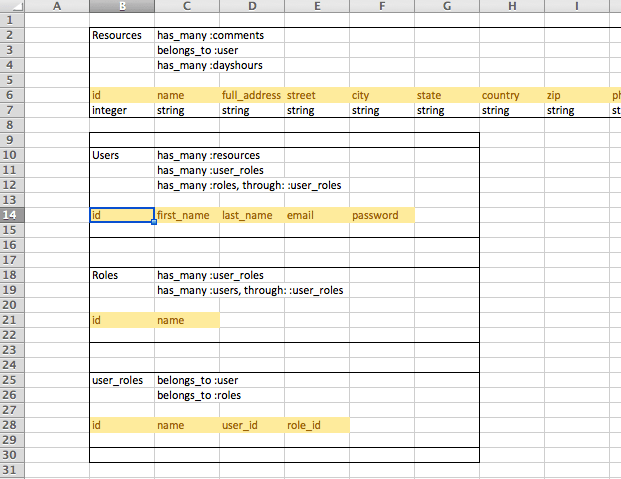
This example is taken from a real live project I’m working on!
Isn’t that exciting!?
I’m using excel to help outline the SQL tables in my project. I am not a punk for doing this. I’m a good boy for doing it. You will waste many hours backtracking your app if you don’t go into your dev with clear tables in mind.
Now, I’m not only keeping tabs on my table columns. I am also making notes about the relationship between the tables. When my program adds a new Resource row, I can think of it “belonging to” the user that created it. In my design, I want users to be able to comment on a resource so I know that a resource will “have many” comments. For our sake, in the following code we’ll be looking at how rails uses the #belongs_to and #has_many methods to make quick work of complicated SQL jargon.
class UserRole # this is the join table or "through" table


  belongs_to :user
  belongs_to :role

 # most of class omitted

end
---------------------------------
class Resource

  has_many :comments
  belongs_to :user


 # most of class omitted

end
---------------------------------
class User

  has_many :resources
  has_many :user_roles
  has_many :roles, through: :user_roles


  # most of class omitted

end
---------------------------------
class Role

  has_many :user_roles
  has_many :users, through: :user_roles


  # most of class omitted

end
Simple < has_many : belongs_to > relationships
In our models above, our simplest-to-think-about relationships are the “user has many resources” and “resource has many comments” relationships, along with their counterparts, “resource belongs to user” and “comment belongs to resource”. When your models fit this simplistic familiarity with one another, creating joins in your code is as easy as saying,
user = User.find_by(id: 1)
user.resources
=> (all resources that belong to user with id = 1)

or

resource = Resource.find_by(:name => "country pantry")
resource.user
=> (the user object that the resource belongs to)
has_many, through relationships
Our users and roles relationships are a bit more tricky, but our calls will be similar to the ones above if setup properly. Join tables are used when one thing can have many of the other and visa versa. Here are the two models once again.
class User

  has_many :resources
  has_many :user_roles
  has_many :roles, through: :user_roles


 # most of class omitted

end
---------------------------------
class Role

 has_many :user_roles
 has_many :users, through: :user_roles


 # most of class omitted

end
Assuming we have a user or role variable instantiated we can now just call…
user.roles
=> (all the roles that user has)

and

role.users
=> (all of the users under that role)
This is all magically generated for you by rails using Active Record performing database calls. Active Record literally creates SQL code for the database you’re using (even Mongo and NoSQL code assuming your gem dependencies are installed)
 vikingtechblog